


Wyze - Never Wonder
4.440.90K Reviews
App Specs
- Version
- 3.20.0.941
- Updated On
- License
- Free
- Downloads
- 10,000,000+
- Developer
- Wyze Labs Inc.
- Categories
- Lifestyle
- Platform
- Android, iOS
Screenshots

 Analysis by AppCompare
When I first opened Wyze, I wanted a straightforward way to manage connected devices rather than another app that made home automation feel like a project. It’s a lifestyle app from Wyze Labs Inc., and its appeal is that cameras, lights, and plugs can be brought together in one place. I found it approachable, though it works best when you’re comfortable building your setup gradually and don’t expect every smart-home task to be handled by one app.
Getting Started with Wyze
The first thing you’ll notice about the Wyze app is its super user-friendly interface. Setting it up was a breeze. All you need is an account, and you’re good to go. The app guides you through connecting your devices with clear, step-by-step instructions. No headaches or confusion here!
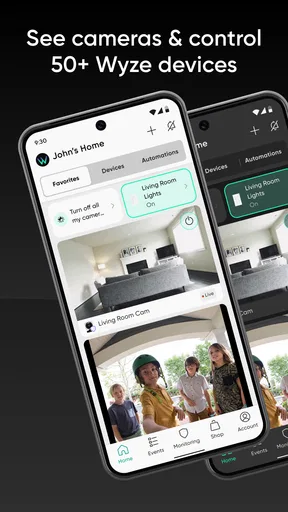
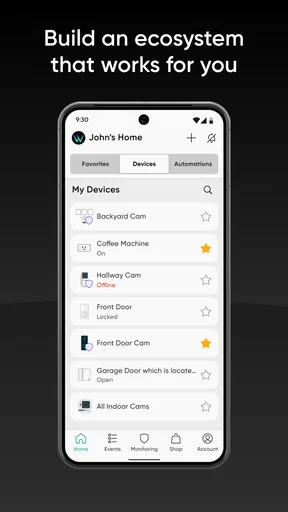
Once I had everything set up, I was able to connect my Wyze cameras, bulbs, and plugs without a hitch. The app supports a wide range of devices, which means you can keep adding to your smart home setup as you go. That’s something I really appreciate because it lets you build your system at your own pace.
Making the First Setup Feel Manageable
If you’re new to smart-home apps, I’d start with one device and one simple goal rather than trying to automate the whole house at once. Install the app, create your account, and follow the on-screen steps for the device you want to add. A camera is a useful first choice if your main concern is checking a room or entrance; a bulb or plug is a less involved way to see how app-based control fits your routine.
Before you begin, decide where the device will be used and what you want to do with it. That small bit of planning helps you choose sensible names and makes later controls easier to understand. If you add several similar devices, names such as “hall light” or “side entrance” are clearer than a row of generic labels. I’d also test the basic control right after setup, while you’re near the device, so you can tell whether it responds as expected before relying on it from elsewhere.
Wyze is free to download, and the app is rated for Everyone. It has a 4.4 average from around 168,000 ratings, with more than five million installs. The current version is 3.10.0.745 and requires Android 10 or later. In-app purchases are available, ranging from $2.99 to $259.99 per item, so I’d check the details of any paid option before deciding it belongs in your setup.
Exploring the Features
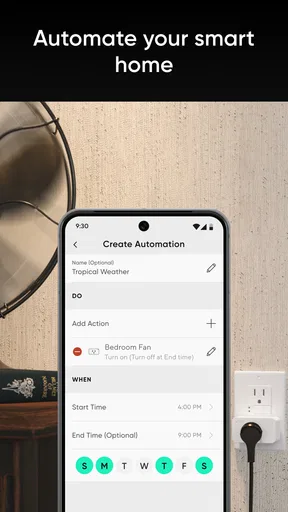
One of the coolest features of the Wyze app is the ability to create schedules and automations. I set my living room lights to turn on just as I get home from work. It’s like the app knows me! And if you’re into routines, you can set up different scenarios based on your preferences or time of day.
Worth Reading Before You Choose

Flipboard Shows What News Apps Must Do Beyond the Feed

Switching to Android Auto Means Rethinking Your Driving Routine

Google Calendar Makes a Crowded Week Easier to Manage

Ludo King Makes the Most of the Minutes Between Plans

Baby Panda World Brings Quick Play to Modern Phones, but Its Game Library Feels Busy

ESPN’s Live Game View Makes Following Close Games Easier
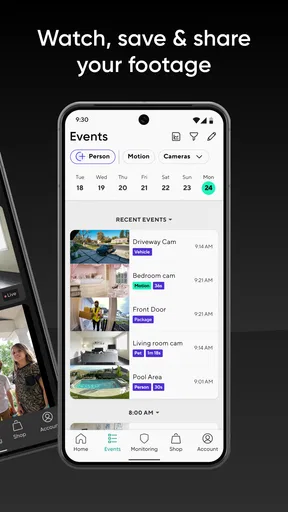
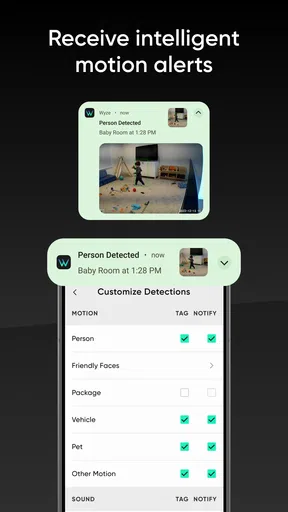
The app also gives you real-time notifications. So, if your Wyze cam catches any movement, you’ll know about it instantly. I found this especially handy when I was expecting a package. No more missed deliveries!
For those who love a good DIY project, the app allows you to customize settings to your heart’s content. You can adjust the sensitivity of your cameras, tweak the brightness of your bulbs, and even set rules for your smart plugs. It’s all about tailoring the system to fit your lifestyle.
From a First Tap to a Useful Routine
A satisfying first success doesn’t need to be elaborate: switch on a connected bulb from the app, or check a camera view when you’re away from its location. Once that works, add a schedule only if it solves a real problem. For example, a light that comes on at a predictable time can make arriving home easier, while a plug schedule may help avoid having to remember a routine manual switch. I’d keep the first automation simple enough that you can tell at a glance whether it did what you intended.
Notifications need a little thought, too. They’re useful when an event matters, such as checking on a delivery, but a flood of alerts can make you stop paying attention. I’d tune camera sensitivity and notification choices gradually, rather than making everything highly sensitive from the start. The right balance depends on where the camera is and how much activity that space normally has. A quiet entrance and a busy shared area won’t benefit from identical settings.
One practical trade-off is that alerts and live viewing serve different purposes. A notification can prompt you to open the app, but it doesn’t replace checking the feed when you need context. I treat an alert as a heads-up, not proof of exactly what happened. That mindset keeps the app useful without expecting every notification to tell the whole story.
Integration with Voice Assistants
If you’re using Alexa or Google Assistant, you’re in luck. The Wyze app integrates smoothly with these voice assistants. I can just say, "Hey Google, show me the front door," and boom, my Wyze cam feed pops up on my phone. It’s like living in the future!
Voice control adds another layer of convenience, especially when you have your hands full or just want to show off to friends. It’s these little things that make the app feel like more than just a tool—it becomes part of your daily routine.
Where It Fits—and Where It Doesn’t
Compared with the usual alternatives—using a separate app for each brand or relying on a phone’s built-in smart-home controls—Wyze is appealing when you own several Wyze devices and want their everyday controls together. Schedules, camera checks, and lighting adjustments can sit in the same app, which reduces the app-hopping that makes a growing setup feel untidy. Voice assistants add another convenient route for basic actions, especially when reaching for a phone is awkward.
That convenience is strongest inside the Wyze ecosystem. If your home already depends on devices from many different manufacturers, don’t assume one app will make them all behave as a single system. I’d check that the devices you plan to use are supported and consider whether you prefer a broader, platform-led smart-home setup. Wyze makes more sense when its own devices are central to your plan than when you want a universal control panel for a mixed collection.
A realistic day-to-day use might be checking an entrance while waiting for a delivery, then switching on a light when you get home. That’s helpful, but it also shows why the app is not a substitute for being at home or for a dedicated security plan. A camera alert can draw your attention; it can’t make a decision for you. If you need a highly specialized monitoring arrangement, compare those requirements carefully before choosing a general smart-home app.
Performance and Reliability
Now, let’s talk about performance. The Wyze app is surprisingly reliable. The connection to my devices is stable, and I haven’t experienced any significant downtime. The app updates regularly, which means bugs get squashed and new features are rolled out frequently.
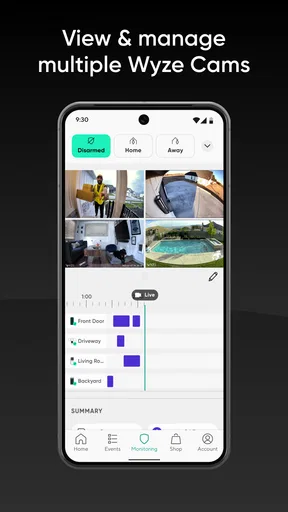
However, I did notice a slight delay when accessing live camera feeds. It’s not a deal-breaker, but something to keep in mind. The developers are pretty responsive, though, so I’m hopeful for improvements in future updates.
Small Frictions Worth Knowing About
That live-feed delay matters more in some situations than others. If you’re casually checking whether a room is empty, a brief wait may be easy to live with. If you expect an instant view every time, it can feel less polished than a direct, immediate control. I’d try the camera in the places and at the times you actually plan to use it before making it part of an important routine.
There’s also a difference between having many settings and needing to adjust all of them. Camera sensitivity, light brightness, schedules, and plug rules give you room to tailor things, but each extra choice can make a setup harder to maintain. My advice is to change one setting at a time and see what it fixes. If an automation becomes confusing, simplify it rather than layering on more rules.
For anyone wondering whether the app costs anything, downloading it is free, but some in-app items are paid. That makes it easy to begin without committing to a purchase, while leaving room to decide later whether an optional item is worthwhile. I’d treat the free app and the total cost of a complete smart-home setup as separate questions: the devices you choose and any paid extras shape the overall spend.
Final Thoughts
All in all, the Wyze app has been a game-changer for me. It’s intuitive, versatile, and makes managing my smart home devices a breeze. Whether you’re a seasoned smart home enthusiast or a newbie looking to dip your toes into the world of home automation, this app has something for everyone.
So, if you’re ready to make your home smarter (and your life a little easier), give the Wyze app a shot. It might just be the smart decision you’ve been waiting for!
I’d recommend it most to someone starting with Wyze cameras, bulbs, or plugs who wants a practical place to manage them and is happy to add devices over time. It’s less compelling if your priority is controlling a wide mix of brands from one universal interface, or if even a short pause before a live camera view would frustrate you. Start with one device, confirm the basic action works, and add schedules or alerts only when they solve a problem you actually have. That’s the path that made the app feel useful to me rather than like another set of settings to maintain.
Pros
- Easy setup with user-friendly interface.
- Affordable pricing for smart home devices.
- Seamless integration with Alexa and Google.
- High-quality video and audio capabilities.
- Regular updates enhance app functionality.
Cons
- Limited compatibility with some devices.
- Advanced features require subscription.
- Occasional connectivity issues reported.
- Privacy concerns with data handling.
- Limited customer support availability.
FAQs for Wyze - Never Wonder
What is Wyze and how does it make your home smarter?
Wyze is a smart home application that allows users to control and monitor various smart devices such as cameras, lights, plugs, and sensors from their smartphones. It integrates seamlessly with your home network, providing a centralized platform to automate and manage your home environment, enhancing security, convenience, and energy efficiency.
Is Wyze compatible with other smart home systems?
Yes, Wyze is compatible with several smart home ecosystems, including Amazon Alexa and Google Assistant, allowing for voice control and integration into broader smart home setups. This compatibility allows users to easily incorporate Wyze devices into their existing systems, providing flexibility and expanding the functionality of their smart home.
What devices can be controlled with the Wyze app?
The Wyze app supports a range of devices, including smart cameras, light bulbs, plugs, locks, and sensors. Users can control and monitor these devices remotely, set schedules, and receive notifications for events like motion detection or door access, providing comprehensive control over their home environment.
Is there a subscription fee for using Wyze services?
While the Wyze app itself is free to download and use, some advanced features, such as cloud storage for video recordings, may require a subscription to Wyze’s premium services. Users should review the app’s pricing model to determine which features are included for free and which require additional payment.
How secure is the Wyze app in terms of privacy and data protection?
Wyze implements robust security measures, including end-to-end encryption and secure server storage, to protect user data and privacy. Regular updates are provided to address potential vulnerabilities. Users are encouraged to use strong passwords and enable two-factor authentication for additional security.


